Making your first short film sounds exciting when you want to delve into the world of film-making and start gaining experience and learning skills towards it. And you might be wanting to go straight at it with your idea by grabbing a camera, grabbing what equipment you need, actors, etc... Then to go on and film. But to everyone's dismay, even big budget directors, there's a lot more behind the scenes work, planning and check-ups to get through first in order to successfully film one scene rather than the whole short film itself.
This whole process is called: Pre-Production; which in this blog, will guide you through the super simple (and not so simple) steps to successfully plan and then execute shooting a scene towards your short film.
Step one
Understand what you want to produce or are working on. This can range from televised production, to short films to big-budget films. It's best to thoroughly go through the pre-production stage so that everyone in your crew/team are on the right track, know what they're doing and when and are on the ball.
But first, while the desire and the idea is still fresh it's best to consider these few steps before the filming process, for example:
1. "The Empty Chair" - The Empty Chair can be figurative or literal, but it's used to be the representation of the very core towards your creative project. Think of the empty chair as your target audience and ask yourself:
- Who is your target audience?
- What genre/what interests would your audience be attracted to with your project?
- Through that would they be interested?
- Who are you making this for?
- What do you get out of this project?
- Why do you want to make it?
And et cetra, et cetra. Once you ask these questions and understand what you're making, for who, for why and for whatever reason. It allows you to be more certain on your project, allows you to be fully focused on your project so that planning, pre-production and production doesn't feel like an after-thought to yourself and other crew members.
2. "The Script" - When wanting to create a short film, it's best to write a screenplay so that you can give an idea to others what your film/scene is about. The best way to write a screenplay is to show not tell a scene. You can give brief scene directions, camera directions, etc.. The details for the filming process such as: lighting, equipment needed, angles that going to be used and so forth can go more in depth with a Shot List and a Script Breakdown, which will be discussed further on upon this blog.
But for now, the script is your main core for general filming.
Now if you are wanting to write the script and have no idea where to start, here this blog will get you started with a decent amount of knowledge.
First off, if you're writing your script on Microsoft Word, you must change your font and the size of the font to Courier, 12 as traditionally this format is used to measure the time frame of your scene, as on average a page from a script would range from about a minute.
For example, the image of the script below would at least run for a bout a minute or two.
Now, after the front page which would be the title of your screenplay in bold, with "written by" your name, then copyright and registered info in the bottom left corner and contact information in the bottom right (in case your sending your screenplay to others to be read). You'll now want to start the scene with a transition, preferably "FADE IN" and then the scene location e.g. "INT. APARTMENT. LIVING ROOM - AFTERNOON" all scene directions, character names and locations are written in caps on the screen.
With all that out of the way, you can now begin writing; but you'll probably need some more help in learning on how to craft a screenplay with more knowledge than going in blind. Therefore, this website: http://www.screenwriting.info/ is a pretty good source for all your script writing needs.

Image source - https://www.writersstore.com/how-to-write-a-screenplay-a-guide-to-scriptwriting/
There's a free website that is ran by Adobe, who provide a free scriptwriting format where you can easily write scripts without the hassle on word for example. There are plenty of brief tutorials on the site that allows you to get to grips with what consists of it, the link to the website is here: https://story.adobe.com/en-gb/
But for now, the script is your main core for general filming.
Now if you are wanting to write the script and have no idea where to start, here this blog will get you started with a decent amount of knowledge.
First off, if you're writing your script on Microsoft Word, you must change your font and the size of the font to Courier, 12 as traditionally this format is used to measure the time frame of your scene, as on average a page from a script would range from about a minute.
For example, the image of the script below would at least run for a bout a minute or two.
Now, after the front page which would be the title of your screenplay in bold, with "written by" your name, then copyright and registered info in the bottom left corner and contact information in the bottom right (in case your sending your screenplay to others to be read). You'll now want to start the scene with a transition, preferably "FADE IN" and then the scene location e.g. "INT. APARTMENT. LIVING ROOM - AFTERNOON" all scene directions, character names and locations are written in caps on the screen.
With all that out of the way, you can now begin writing; but you'll probably need some more help in learning on how to craft a screenplay with more knowledge than going in blind. Therefore, this website: http://www.screenwriting.info/ is a pretty good source for all your script writing needs.

Image source - https://www.writersstore.com/how-to-write-a-screenplay-a-guide-to-scriptwriting/
3. "Storyboarding" - Storyboards are images/drawings that gives a pre-visualisation of the scene that you are about to film. The scenes don't require that much writing or even that much drawing as you can visual a scene with basic drawings of shapes and stick figures and give action directions or camera angles and directions.
It's best to have a storyboard when filming a scene, alongside the script so that your cast and crew can be on the same page as one another and visualise the same scene.
Here is an example of storyboard visualisation: (You're storyboards don't have to be artistic masterpieces in every frame, this just gives the general idea)

Image source: http://www.richardbuxtonart.com/Storyboards
And finally,
4. "Locations/Set" - You need to find out where to shoot your scene, what will look good visually. You need to ask yourself a few questions before diving in and filming your scenes at various locations:
- Does it fit the mood of the scene?
- Does it the setting suit the feel of your short film?
- Does it look good?
You must ask yourself these questions and picture the scene with your script and storyboard to see whether or not the location/setting you picked is suitable for the scene you want to film.
Managing your production
All this is, is refining the emphasis for keeping on the same page for all your cast and crew. This can be done by creating a production log, a call sheet and a script breakdown. These are formats you can use to organise effectively when filming. But you can use other methods similar to organise your crew/cast for times filming, filming at, scenes that are being filmed, equipment needed, people required for the shoot, etc... However further on the blog, script breakdown's, shot lists and production logs will be better explained in more detail.
For now, Call sheets and general communication is key to managing your cast/crew and ensuring they know what's going on, when to be on set, how long they'll be shooting for and who will be needed.
An example of a call sheet:

Link to the example of a Call Sheet - https://drive.google.com/open?id=1zGxLzQr9YjTY7KSVrlzkNPmu_hLE0pHqBo67RvFtE7w
What would consist of a call sheet, would be the times people would be needed on set; so 9:00am for example. And wrapping time, when filming for the day has finished; unless if overtime is requested, location filmed at, lunch times, shooting schedules, etc... From the link, it's pretty self explanatory for what to fill in.
However you should also contact everyone who is filming/who is required. E-mails or social media, as long as they're informed, given constant updates, etc... As it is effective for your organisation.
Step three
What you'll need when filming a scene:
A Script Breakdown; a Script Breakdown gives an idea of what's going on in a scene and thoroughly goes over who will be need, the equipment, time of day shooting, props, animals, sound effects, practical effects, vehicles, grips and so forth. These will be written out for each scene in a script so that there is organisation amongst crew and everyone knows where to be, what to bring and what to be doing when filming the shots for the scene.
You'll note what camera's you are using, models, lenses. Mic's you are using and all sorts.

Script Breakdown Template
https://drive.google.com/open?id=0B1ZQTcEZxgjeWjZLR2VLSFBNUTA
Step four
Handling budget is tricky, but let's imagine your production is a professional, fully funded production; as it gives insight for how you should plan effectively and budget sensibly.
For equipment you can rent them out at rent-houses for a day or over a weekend. Likewise props, software and all sorts.
For crew/cast there is a website called: https://www.bectu.org.uk/home and in https://www.bectu.org.uk/advice-resources/rates you can find out pay rates for required cast/crew that are needed when filming.
It's best to keep a log of who was needed on set and how much they are being paid for the day (as throughout filming, paid services are paid for a full days work, not hourly).
Step five
A few ways to communicate through your crew/cast so that they know what their role is and what they're doing is through a Shot List and a Production Log.
Shot Lists are just a breakdown of each shot through each scene, so it gives further insight to what's going on in the take, who's needed, what props are required, what they're doing and the framing of the shot used for the scene.
Production Logs allow you to keep track of all that you've shot so that you don't lose track of where you, accidentally film the same scene again or in the case of re-filming, going through the notes, etc...
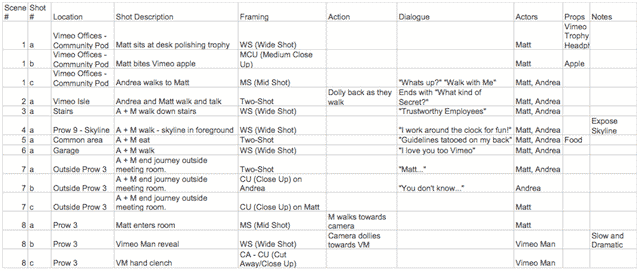

Shot List
https://vimeo.com/blog/post/making-a-shot-list
Production Log Template
https://drive.google.com/open?id=1RHTs70XrckIJZovmA-UcCi3lNCdSwr_j0KlHgFsMFFw
Step six
Copyright is a mixed bag when it comes to things, for example using a song made by someone else in your production or footage may seem like no harm done, but can be if you break fair use..
In the United States, fair use is determined by a judge, who analyses how each of the four factors of fair use applies to a specific case.
1. The purpose and character of the use, including whether such use is of commercial nature or is for nonprofit educational purposes
Courts typically focus on whether the use is “transformative”. That is, whether it adds new expression or meaning to the original, or whether it merely copies from the original. Commercial uses are less likely to be considered fair, though it is possible to monetise a video and still take advantage of the fair use defence.
2. The nature of the copyrighted work
Using material from primarily factual works is more likely to be fair than using purely fictional works.
3. The amount and substantiality of the portion used in relation to the copyrighted work as a whole
Borrowing small bits of material from an original work is more likely to be considered fair use than borrowing large portions. However, even a small taking may weigh against fair use in some situations if it constitutes the “heart” of the work.
4. The effect of the use upon the potential market for, or value of, the copyrighted work
Uses that harm the copyright owner’s ability to profit from his or her original work are less likely to be fair uses. Courts have sometimes made an exception under this factor in cases involving parodies.
Posting the four factors of fair use in your video or including the phrase “no infringement intended” won’t automatically protect you from a claim of copyright infringement.
Declaring your upload to be “for entertainment purposes only”, for example, is unlikely to tip the scales in the fair use balancing test. Similarly, “non-profit” uses are favoured in the fair use analysis
If you were to make profit through using someone else's work, you would have to ask permission and give a percentage.
And to conclude
Just have confidence in yourself, even the greatest film-makers look back on their spectacular films with ways they could've improved. It just takes practise, as they say practise makes perfect and you can only get better.
Note: Sources are here if you want further insight on what's been discussed through the blogpost.
Sources:
http://www.reelmarketer.com/pre-production-six-must-do-steps-before-video-shoo/
https://www.bectu.org.uk/home
http://www.screenwriting.info/
https://vimeo.com/blog/post/making-a-shot-list
http://www.empireonline.com/movies/features/film-studies-101-camera-shots-styles/http://www.reelmarketer.com/getting-proper-permission-releases-for-video-production/
https://www.videomaker.com/article/c18/8946-11-tips-for-location-scouting
http://www.mediadoghire.com/
